IPTV EPG & XMLTV Explained: tvg-id, Channel Mapping & Missing Guide Data
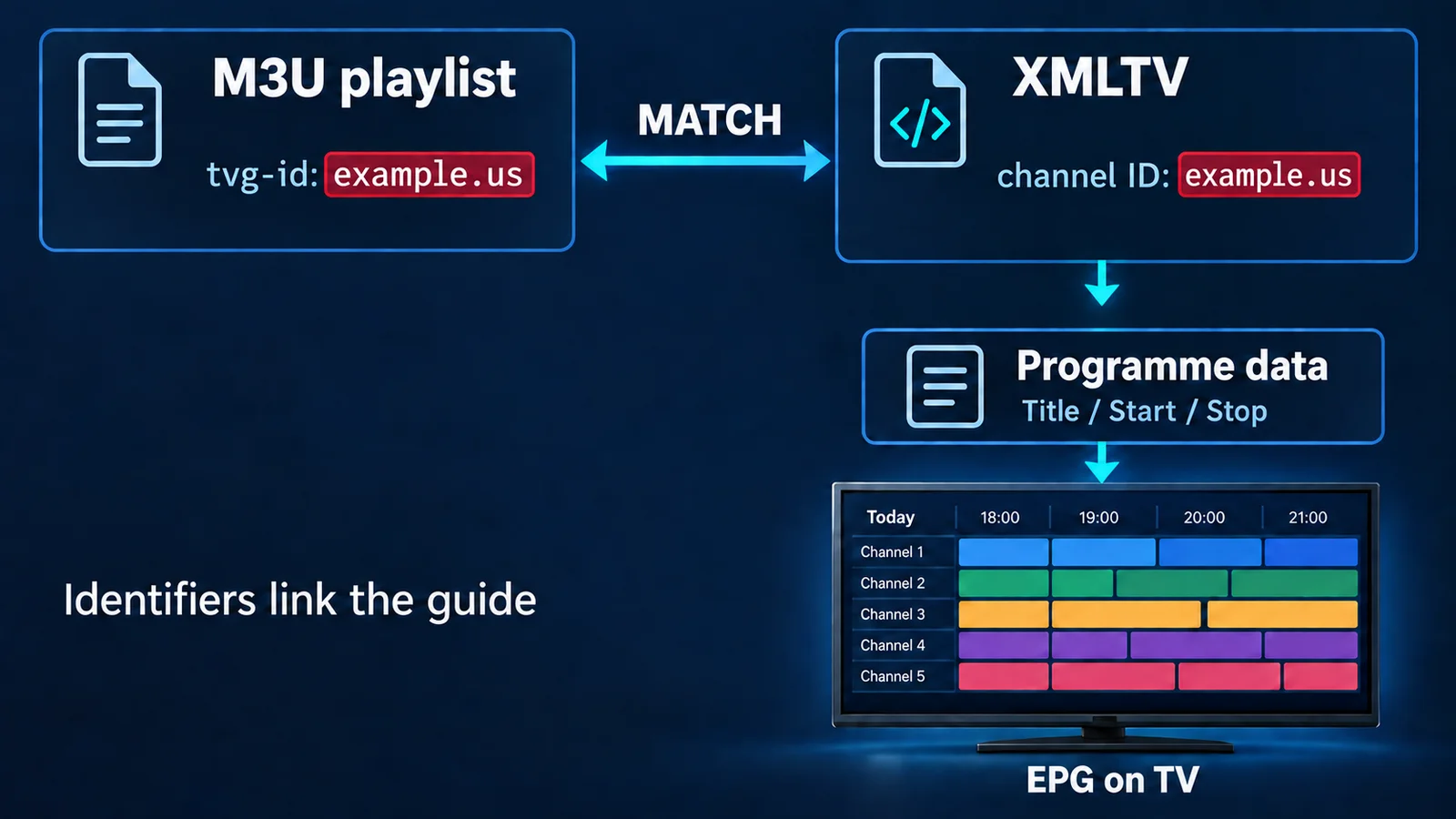
An IPTV EPG is the programme-guide data beside your live channels. XMLTV is a common format for delivering those listings. The playlist and guide are separate: a value such as tvg-id connects a playlist channel to its XMLTV schedule. If that mapping, the source, timestamps or player configuration is wrong, video can play normally while the guide shows incorrect times or "No Information."
What Is an IPTV EPG?
EPG means Electronic Program Guide. It supplies the current and next programme, schedule grid, titles, start/end times and descriptions. Categories, artwork and episode information may also appear when the source provides them and the player supports them.
The EPG does not deliver video. Selecting a channel opens a media source; opening its guide reads schedule metadata. In the Flash 4K IPTV viewing experience, those systems meet on one screen, but success in one does not prove the other is healthy.
| IPTV Component | Purpose | Example |
|---|---|---|
| Playlist/channel list | Identifies channels and their media addresses | M3U or Xtream-based list |
| Live stream | Carries audio and video | A channel's HLS or TS feed |
| tvg-id | Links a playlist entry to guide data | example.us |
| XMLTV channel | Describes a guide channel | <channel id="example.us"> |
| XMLTV programme | Describes a scheduled broadcast | <programme ...> |
| EPG URL | Locates the schedule data | XML or compressed XML source |
What Is XMLTV?
XMLTV is an XML-based television-listings format. Think of it as a structured schedule that software can read. This fictional example contains one channel and one broadcast; the dates demonstrate syntax, not a permanently current guide.
<?xml version="1.0" encoding="UTF-8"?>
<tv>
  <channel id="example.us">
    <display-name>Example TV</display-name>
  </channel>
  <programme start="20260920180000 +0000"
             stop="20260920190000 +0000"
             channel="example.us">
    <title lang="en">Evening News</title>
    <desc lang="en">A fictional daily news programme.</desc>
  </programme>
</tv>
The <channel> record describes the station. Its id identifies it, while <display-name> gives a human-readable name. Each <programme> refers to that identifier through its channel attribute. Here, start and stop bound the broadcast, and <title> names it.
The XMLTV project's format definition specifies these relationships. The format permits channel descriptions without programmes, so finding a channel name in a feed does not prove it contains listings for today.
How M3U, tvg-id and XMLTV Work Together
Here is the matching M3U entry. The address uses the reserved .example domain for illustration and will not play a real channel.
#EXTM3U
#EXTINF:-1 tvg-id="example.us" tvg-name="Example TV",Example TV HD
https://stream.example/live/example.ts
Playlist side
#EXTINF
tvg-id="example.us"
XMLTV side
<channel id="example.us">
<programme channel="example.us" ...>
The player loads the channel list, imports guide records, associates their identifiers and displays programmes covering the selected time window. The video URL is independent of this association. A broken match can leave "Example TV HD" playable but its schedule empty.
Xtream-based players may obtain equivalent channel and guide associations through provider APIs rather than a visible M3U file. That does not eliminate the need for correct metadata. For login and playlist differences, see M3U vs Xtream Codes.
What Is tvg-id in IPTV?
tvg-id is a playlist attribute commonly used as the EPG mapping key. It is not the channel's stream address, screen label or logo. These fields can coexist without containing identical text:
- tvg-id: the guide identifier, such as
example.us. - tvg-name: a name hint that some players use for matching.
- Visible channel name: the label after the M3U entry's comma, such as "Example TV HD."
- tvg-logo: an image reference; matching logos do not establish matching schedules.
A playlist containing Example.us and a feed containing example.us may behave differently across players. Kodi IPTV Simple's documented EPG settings include an option to ignore identifier case. Other implementations may use exact matches or name fallbacks.
Punctuation, suffixes and regional identifiers also matter: example.us and example.west.us may describe different schedules. Renaming a visible channel does not necessarily change its identifier or repair an existing manual assignment.
Why IPTV Shows "No Information"
The player has no usable programme entry for that channel and displayed time. That symptom alone does not identify the failed layer. Use the scope of the problem to choose the first check.
| Symptom | Likely Cause | First Diagnostic Step |
|---|---|---|
| All channels blank | Unavailable, unassigned or failed EPG source | Verify source assignment and last successful import |
| Some channels blank | Missing programmes or mapping mismatch | Compare tvg-id, XMLTV ID and date coverage |
| Wrong programme shown | Incorrect or regional channel assignment | Compare the assigned channel's actual schedule |
| All programmes shifted | Timezone, source or player offset issue | Check device time and timestamp offsets |
| Old listings remain; EPG stopped updating | Cache, refresh failure or provider change | Inspect feed dates and the last import result |
| Works on only one device | Different app settings, mapping or cache | Compare source, version, assignment and timezone |
| Channels play; guide does not | Separate media and metadata paths | Inspect guide retrieval independently of playback |
If the guide request returns an HTTP error, that is evidence about retrieval, not channel matching. Our IPTV error codes guide explains those responses. A successful download still needs to contain valid schedule data, rather than an HTML login page.
Why Some Channels Have EPG and Others Do Not
A partially populated guide suggests that at least some data imported successfully. Compare one working channel with one blank channel: does the blank channel's identifier exist, and are there programme records for it during the missing period?
Possible causes include absent listings, a renamed channel, changed provider IDs, regional variants, duplicate display names or a source using a different naming system. A schedule might end tonight even though other channels have several days of data.
Adding another XMLTV source helps only if it supplies the correct schedule and the player associates it correctly. More sources can create ambiguous matches. "Example TV East" and "Example TV West" may share branding while showing different programmes at the same instant.
How IPTV Channel Mapping Works
Automatic mapping
The player attempts to associate playlist entries with guide channels, often starting with identifiers. Name-based fallbacks are implementation-specific. Matching text is useful evidence, but a similar name alone cannot establish the correct country, region or time-shifted service.
Manual mapping
An "Assign EPG" or equivalent feature lets you explicitly associate a playlist channel with a guide entry. Conceptually, select the affected channel, choose the imported source and correct guide channel, then check its current and next programmes. Save the association and confirm it survives a refresh.
Controls differ between TiviMate, IPTV Smarters, OTT Navigator, Kodi and other IPTV player apps. Availability also varies on Smart TVs, Firestick, Android TV, Apple TV and mobile devices. If the app lacks manual assignment, an editable playlist may need its identifier corrected instead. Preserve a backup before editing.
For example, manually linking playlist ID example.us to source ID example-east tells the player they represent the same schedule. It does not rename either record or repair an empty feed. Check the assignment again after changing providers or EPG sources, because the saved target may no longer exist.
Why Your IPTV EPG Shows the Wrong Time
XMLTV does not always store everything in UTC. A timestamp can include an explicit offset. On September 20, 2026, 20260920180000 +0000 and 20260920200000 +0200 represent the same instant: 18:00 UTC.
The player interprets the timestamp and offset, then displays it using its timezone handling, usually tied to device settings. XMLTV's format definition assumes UTC when no timezone is supplied; a source that writes local clock time without the required offset can therefore mislabel the instant.
One instant, different clock readings
XMLTV: 20:00 +0200 → interpreted instant: 18:00 UTC → player/device zone UTC+01:00 → displayed time: 19:00
- Check device date, time and timezone. A correct-looking clock with the wrong zone is still suspect.
- Compare a known programme with the broadcaster's authoritative schedule, accounting for the schedule's displayed timezone and channel region.
- Check the scope. An equal shift across every channel suggests a shared setting; one affected region suggests a narrower source or mapping issue.
- Inspect the player's EPG offset. Note global and channel-specific adjustments; an old correction may now be applied twice.
- Inspect the XMLTV timestamp and offset. Determine whether the source actually describes the expected instant.
- Only then apply a manual correction if necessary. Record its scope and remove it when the underlying source is corrected.
A blind +1-hour shift can make today's grid look right while hiding bad provider configuration or app-specific parsing. Tomorrow's listings, another region or the next clock change may expose the error again.
EPG Time Zones and Daylight Saving Time
DST introduces a date-dependent offset. The source country's clock rules and the viewer's timezone are separate: countries can change clocks on different dates, and some do not change them at all.
Correctly offset timestamps identify the broadcast instant even around clock changes. The device or player must then display that instant using the viewer's rules for that date. A provider using last week's fixed offset, outdated timezone information or an old player correction can create a temporary one-hour error.
During an autumn clock change, the same local clock reading may occur twice with different offsets. Compare complete timestamps, not just "01:30." If only foreign channels shift for a few weeks, investigate their source-region conversion before moving the entire guide.
What Is an IPTV EPG URL?
An EPG URL points the player to programme-guide data. A playlist URL supplies the channel list and media references. Putting the playlist address into an XMLTV field usually gives the player the wrong kind of document.
Guide addresses often end in .xml or .xml.gz; the latter commonly contains gzip-compressed XML. Valid endpoints may instead use a script path or query parameters. The returned content and player support matter more than the suffix.
Use the provider's designated guide address and verify it is assigned to the intended playlist. Some players discover it through playlist metadata or account setup; others need explicit configuration. Treat authenticated guide URLs as private and redact tokens before sharing diagnostic screenshots.
Can You Use a Different XMLTV Source?
Often yes, if your player accepts custom EPG sources. Confirm that the alternative covers the exact channel region, contains current dates and uses a supported format. Then compare its IDs with the playlist or assign channels manually.
A new feed can contain excellent listings under example-east while your playlist expects example.us. Downloading that feed alone does not establish their relationship. With several sources, check assignment or source priority to avoid importing the right schedule but displaying a different one.
When evaluating guide coverage for flash 4k, distinguish available listings from successful mapping. These are separate checks, just as picture quality and programme descriptions are separate parts of the viewing experience.
EPG Cache, Refresh and Stale Guide Data
The provider publishes a schedule; the app downloads and imports it; a local cache or database keeps listings available. Each stage can become stale. A refresh attempt is not necessarily a successful import.
Check the last successful update and the actual date range in the source. If the feed itself ends yesterday, clearing local data cannot invent today's programmes. If the source is current but the app keeps old records after an endpoint change, a targeted guide refresh or rebuild may help.
Avoid repeatedly clearing all app storage. That can remove playlists, credentials and manual assignments. Use the documented EPG-specific action where available, and retain your configuration. A successful refresh should be confirmed by updated listings, not merely a spinner disappearing.
Trace the EPG Problem
- Do channels play? No → investigate playback/account/connectivity first; the problem may extend beyond EPG. Yes → follow the guide-data path.
- Is all guide data missing? Yes → check source availability, assignment, download and import. No → narrow the affected channels.
- Are only some channels blank? Compare tvg-id with XMLTV IDs, then verify programme coverage for the displayed dates.
- Does the guide exist but show wrong times? Compare device timezone, XMLTV offsets, player adjustments and DST rules.
- Is the wrong programme attached? Inspect incorrect mapping, duplicates and regional assignments before shifting timestamps.
Use one affected channel as a traceable example. Record its playlist ID, assigned guide ID, source, programme timestamp and displayed time. That small evidence set is more useful than changing multiple settings at once.
EPG vs Catch-Up TV: What Is the Difference?
EPG is schedule metadata. Catch-up is access to previously aired video, requiring provider archives and compatible player behavior. A guide can supply the interface for selecting an earlier programme without guaranteeing that its video is available.
Correct titles and times do not prove an archive exists, covers that channel or remains within its retention window. If listings are mapped correctly but past programmes fail to play, use the dedicated guide to fix IPTV EPG and catch-up TV.
Frequently Asked Questions
What is EPG in IPTV?
An Electronic Program Guide supplies channel schedules, including current and next programmes, titles and broadcast times. It describes the content; it does not carry the video.
What is XMLTV in IPTV?
XMLTV is an XML-based listings format used to exchange channel and programme metadata. A player imports it to populate the TV guide.
What does tvg-id mean?
It is a playlist attribute used to associate a channel with guide records, commonly by matching the XMLTV channel ID. It is separate from the visible name.
Why does IPTV say "No Information"?
The player has no usable listing for that channel and time. Possible causes include failed guide retrieval, missing programme data, incorrect mapping or time interpretation.
Why does EPG work on some channels but not others?
Some identifiers may match while others do not, or the source may cover only certain channels and dates. Compare a working channel with a blank one.
Why is my IPTV EPG one hour ahead or behind?
Check device timezone, source timestamp offsets, DST and existing player corrections. A one-hour discrepancy does not automatically justify a global one-hour shift.
Can I add my own XMLTV EPG?
Often, if the app supports custom sources. The feed must contain suitable schedules, and its channel identifiers still need to map to your playlist.
Why doesn't a new EPG source automatically match my channels?
Importing listings and assigning them are separate operations. Different IDs, regional variants or ambiguous names can require manual mapping even when the schedule exists.
What is the difference between an EPG URL and an IPTV playlist URL?
The playlist URL supplies channels and media references. The EPG URL supplies schedule metadata. They are different inputs even when hosted by the same provider.
Is EPG required for IPTV to work?
Generally no: a player can open a valid live stream without programme listings. Missing guide data can affect navigation without breaking audio or video.
Does EPG control catch-up TV?
It may provide programme selection and timing, but catch-up also requires accessible archived video and compatible requests. Having listings alone does not enable replay.
Can two channels use the same EPG data?
Yes, when they genuinely share a schedule, such as matching SD and HD simulcasts, and the player supports the association. Regional or delayed variants may need separate assignments.